Sudowrite Review: What an AI Writing App Did to My 10,337-Word Story Draft
✦ Toolcraft | No. 1 ✦ 7 tools, 7 verdicts, 5 tests for any writing app & the day my edits looked erased.

Most reviews of AI writing apps test them on demo text: a paragraph nobody cares about, pasted in to see what comes out. That tells a writer nothing. The only honest test of a writing tool is a manuscript you care about, and the only question worth asking is what the tool left on your pages when you were done.
I call those traces tool marks, my term, borrowed from woodworking, where it means the scratches a chisel or a plane leaves on the wood it shaped. This is issue No. 1 of Toolcraft: honest reviews of writing apps, judged by what each one leaves on the manuscript. Readers get a straight answer about whether an app is worth the money. Writers get 5 tests they can run on any tool, including the one they already pay for.
First up is Sudowrite, an AI writing app built for fiction, which I ran on a 10,337-word story draft of my own. Disclosure before anything else: I build a competing tool, Nib™✏️. Weigh everything below with that in mind.
Inside this post
- 🧰 7 Sudowrite tools + my 7 verdicts, in 1 interactive graphic
- 🧪 The 5 tests I run on every writing app (my terms: the Whole-Story Test, the Continuity Test, the Specific-Note Test, the Voice Test & the Authorship Test)
- 🔌 The 1 plugin worth keeping + its 1,000-word ceiling
- 🍝 Feedback, Describe & Brainstorm: where the built-in tools missed
- 📦 1 story, 3 cargo lists: how the Story Bible lost track
- 😱 The day my edits looked erased
- ✏️ What I built instead: Nib™✏️
- ✅ Try it now: 3 checks for writers & readers of AI-assisted fiction
Sudowrite, tool by tool
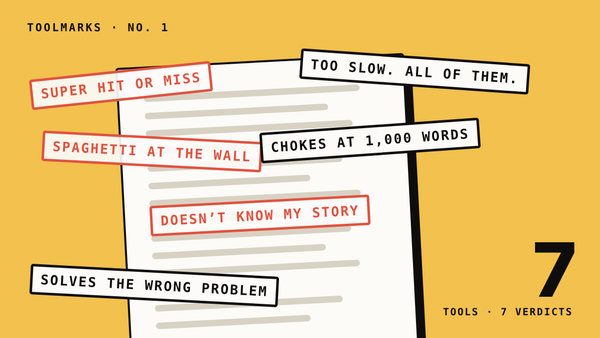
The short version comes first. Hover over or tap each numbered tool to read my verdict and what I found in the project file.
Toolcraft · No. 1 · Sudowrite
Sudowrite, tool by tool: what each one left on my draft
Hover or tap a numbered tool. This is a diagram of the app's layout, not a screenshot.
Verdicts are mine, after using Sudowrite on one real story draft. “From the project” lines describe what is in that project file.
What I used it for
The draft is “We Retrieve Mom,” a story about a technician who transports and repairs rebuilt bodies and is assigned to deliver one he did not ask for. The Sudowrite project holds 1 document of 10,337 words, 8 plugins on the toolbar, and a Story Bible with 10 characters and 15 worldbuilding entries. The Story Bible is Sudowrite’s file of characters and world details, which its tools read from when they respond. I wrote and edited the opening scene myself.
The 5 tests I run on every writing app
A writing app can cost a writer 5 things: the whole story, the facts, useful notes, the voice & the claim to the words. I made 1 test for each, & every Toolcraft review will reuse them. Each test ends in a count you can repeat on your own draft.
- The Whole-Story Test: how much of my manuscript can the app read at once? Count the words it accepts & divide by the words in your draft.
- The Continuity Test: when I change a fact, does the app catch every place that now contradicts it? Change 1 fact & count what it flags.
- The Specific-Note Test: does its feedback point to a line in my draft, & is it right? Of 10 notes, count the ones that quote your pages & hold up.
- The Voice Test: after the app touches a passage, does it still sound like me? Count the stock phrases it added per 1,000 words.
- The Authorship Test: when I’m done, can I show which words I wrote & which the app wrote? Look for a mark in the manuscript or a full history.
Toolcraft · The 5 tests
5 tests for any writing app. Sudowrite failed 4.
The Whole-Story Test
How much of my manuscript can the app read at once?
10%: 1,000 of 10,337 words
The Continuity Test
When I change a fact, does the app catch every place that now contradicts it?
3 cargo lists. The app treated all 3 as true.
The Specific-Note Test
Does its feedback point to a line in my draft, & is it right?
1 plugin asked a real question. Feedback rarely did.
The Voice Test
After the app touches a passage, does it still sound like me?
No. It did not sound like me.
The Authorship Test
Can I show which words I wrote & which the app wrote?
0 marks in the manuscript. History kept 3 items.
Scored by Christian Harder on one story draft of 10,337 words, November 2026.
Where Sudowrite is strong
The plugins are the best thing here, and the reason I’m still paying. A plugin is a small add-on from Sudowrite’s public directory that does one job on a passage. The one that earned its place is called Characters Prompt the Author. It didn’t write a sentence of my story. It had my narrator ask me which language his mother used to speak. That is a real revision question, & it is the reason Sudowrite earns a mixed score on the Specific-Note Test instead of a failing one.
The ceiling is input. The plugins I ran, like the built-in tools, take 500 words, 1,000 at the absolute max. My story is 10,000 words of context. Hand a tool 1,000 of them and it’s reviewing a paragraph it found on the sidewalk. For long-form work, that’s pretty useless. That is the Whole-Story Test, & Sudowrite failed it: 1,000 of 10,337 words is 10% of the story.
Where it failed me
Feedback: super hit or miss. It promises to strengthen dialogue and fix pacing. What comes back is rarely a specific, accurate note on my pages. It reads like a general chatbot ran a word count on my scene and spat out the results. It’s fine for catching consistency slips, and even there I have to check its work, as the cargo lists below show.
Describe: works fine, solves the wrong problem. Describe is technically efficient and rarely useful. If I’m highlighting something and asking a machine what it looks, sounds or smells like, that thing shouldn’t be in my story. Cut it. If it belongs there, I know its sensory qualities pretty much immediately.
After Hours · Nib™
Put someone behind a closed door.
- Sight
- The hall was empty.
- Sound
- A key scraped in the lock.
- Touch
- My own key dug into my palm.
Three sentences give the reader two key holders. Only one appears on the page.
Try it: Write a three-line scene in which one person can only be heard.
Brainstorm: spaghetti at the wall. It throws everything at the wall to see what sticks. Sometimes it hits. Often it misses. I can miss on my own, and faster.
There is research behind the shrug. In a 2024 study in Science Advances, Anil Doshi and Oliver Hauser had people write short stories, and gave some of them story ideas from an AI model. Evaluators rated the AI-assisted stories as more creative, better written and more enjoyable, and the gain was largest for the least creative writers. But the AI-assisted stories were also more similar to one another than the stories written without help. That matters to any writer weighing a brainstorm button: the ideas can lift a weak draft, and the drafts they lift start to resemble each other.
Speed: too slow, all of them. Every tool takes too long. By the time a result comes back, I’ve written the sentence myself.
1 story, 3 cargo lists
This is the Continuity Test, & Sudowrite failed it. My story has a shipment of crates, and each crate holds a resurrected thinker. I changed who’s in the crates. The Story Bible didn’t notice.
Toolcraft · The Continuity Test
1 story. 3 different cargo lists. Only 1 name is on all 3.
In the Story Bible
- Ben Franklin
- St. Augustine
- John Milton
- Baudrillard
In the drafted scenes
- Derrida
- Origen
- Burke
- Baudrillard
In my current outline
- Paine
- Baudrillard
- Burke
- Origen
- Tertullian
- Barthes
- Locke
- Rousseau
On all 3 listsOn 2 listsOn 1 list
The crates in “We Retrieve Mom,” as listed inside one Sudowrite project on November 19, 2026.
Now there are 3 cargo lists, one in the Story Bible, one in the drafted scenes and one in my current outline, and the app treats all 3 as true. Then Feedback made it worse. Its Consistency note told me the Story Bible lists the crates as Derrida, Origen, Edmund Burke and Baudrillard. The Story Bible entry says Ben Franklin, St. Augustine, John Milton and Baudrillard. It corrected my draft against a Story Bible that doesn’t exist.
I posted the corrected list in the app and asked it to update. 5 hours later the Story Bible entry was unchanged. A bible that doesn’t change when the story does is a souvenir of an earlier draft, and every tool that reads from it is working from stale information.
The day my edits looked erased
Chat is the panel where you ask Sudowrite about your own project. Today my edits got erased, or looked like it. I pasted the whole scene into Chat to ask whether it still existed anywhere. My exact message: “somehow my edits got erased and I’m trying to reinstate them.”
Chat checked 6 phrases against the draft and said the server copy was intact: it’s all there, probably a display or sync issue, nothing to reinstate. Good. But I should never have had to ask. A writing app has one job before any of the clever ones: don’t make me wonder where my pages went.
Also, the first thing I ever asked Chat was “What happens next?” It answered with a question.
The verdict
Sudowrite failed 4 of the 5 tests. Whole-Story: its tools read 1,000 of my 10,337 words. Continuity: 3 cargo lists, & the app treated all 3 as true. Voice: what it wrote did not sound like me. Authorship: I found no mark in the manuscript showing which words came from the app, & the History panel kept 2 plugin outputs & 1 Draft card, which was the whole trail. It earned a mixed score on the Specific-Note Test, because of the plugins.
If you want an app that makes your characters ask you questions, the plugins earn a look. If you need an app to hold a 10,000-word story in its head, this one didn’t hold mine.
What I built instead: Nib™✏️
Nib™✏️ is the manuscript editor we’re building at Poetic.ly. It’s in beta, and I built it around the same 5 tests.
- The Whole-Story Test. There is no word limit with a free account (2,000 words before you sign up).
- The Continuity Test. The Story Record holds the facts your draft has to keep, & the Drift Check finds where the manuscript contradicts them. The check is free & instant.
- The Specific-Note Test. Nib™✏️ measures your own pages & shows you what an editor would see.
- The Voice Test. Nib™✏️ never writes over you.
- The Authorship Test. Nib™✏️ logs every AI insertion, measures it as you revise & sums it up in an AI-use statement you can copy.
The part I care about most is the library. Sudowrite’s notes read to me like one general model’s opinion. Nib™✏️ counts your draft against 61 published stories and poems from Ploughshares & The Kenyon Review, in the Shelf tab, and that library was chosen and organized by people. On the Fellowship tier, the Margin shows published passages doing what your paragraph is doing, with the criticism that bears on them, each cited and linked.
Try it now
- Run the 5 tests on whatever writing app you use. How much of your draft can it read? Does it catch a changed fact? Do its notes quote your pages? Does its writing sound like you? Can you show which words are yours?
- Open your character notes beside your latest chapter and list every fact that no longer matches.
- Before you ask any tool to describe something, ask whether that thing belongs in the story.
Tell us which writing app Toolcraft should take apart next.